 HoopReady
JPG to PES
A JPEG converts to PES perfectly well. The catch is specific to this pair of formats: JPEG invents faint colour around every hard edge, and PES is the format that stores a thread entry for each colour block — so an artefact that begins as a compression halo ends up as a spool the machine asks you to load. Below is the same design digitized twice, once from each file.
One design, two files, two thread lists
The monogram on the left was digitized from a clean export; the one on the right from the same export saved as a heavily compressed JPEG. Both at 90 mm on rule set 1.3, both by the same engine, no hand editing on either. One thing to say before the pictures: the free check sends this particular design to a digitizer anyway, for its 0.78 mm hairlines — what you see below is the engine's raw output on both files, because the question here is colour and not line width.
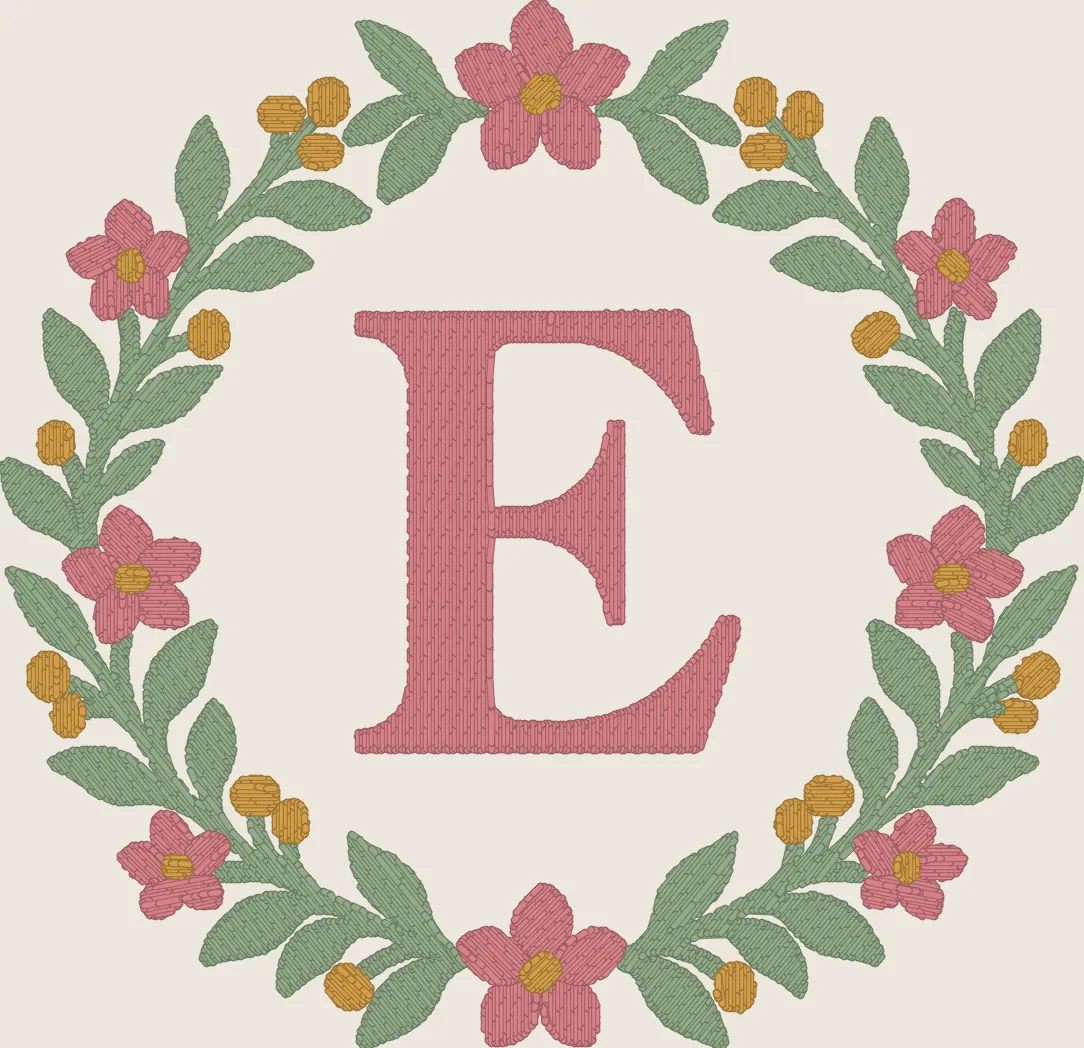
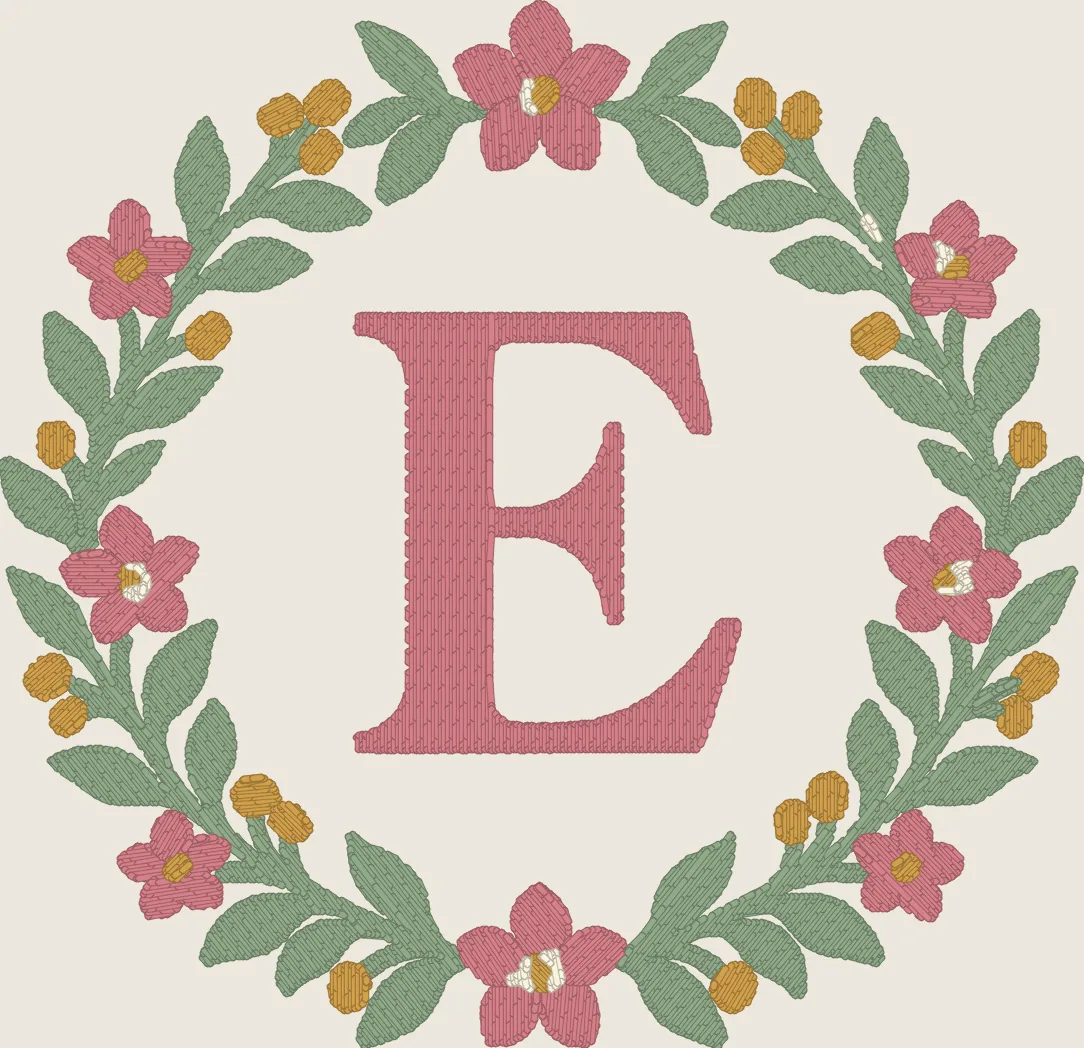
Why PES makes it visible and DST does not
Both files sew the same blocks in the same order. The difference is what each one carries about them: a PES entry holds a colour, so your Brother or Baby Lock reads the invented one off the file and shows it by the nearest name in its own palette — which is exactly what makes it look chosen. The same design as DST would carry a colour-change command and no colour, and the extra stop would arrive unexplained instead. Neither is better; the PES is simply more honest about what it was given.
What a PES stores in general, and why the names on the screen are the machine's rather than your brand guide's, is on the PNG to PES page. The measurement behind the haze — the same design at four compression settings, read by the free check — is on JPG to DST.
If the JPEG is your only copy
- Upload the original JPEG rather than a screenshot or a copy forwarded through a messaging app. Re-saving cannot restore edges already lost to compression.
- Compare the free check's palette with the colours you actually want sewn. Note any unwanted background or edge haze when describing the design.
- Give the intended width and garment, and type any lettering exactly. Review those details in the prepared-art preview before approving it.
- Confirm PES support and the embroidery area in your machine's manual. Our format guide helps separate the input picture from the file your machine needs.
What to send instead
Whatever the JPEG was made from: the design file, a PDF, an SVG, or a PNG exported at full quality. Saving the JPEG as a PNG does nothing — the halo is already in the pixels. If the original is genuinely lost, send the JPEG anyway and say so: the free check reports the colour count before you pay, and a design that measures one colour over is a conversation we would rather have then than after delivery. Basic allows 5 colours and Standard allows 6, so an invented colour can move a design a tier even when nothing about the design changed.
Delivery takes 1–3 business days, most orders the same day.
Questions
- My embroiderer says the file has a colour we do not use. Where did it come from?
- Very likely from the file you sent rather than from the digitizing. A compressed JPEG leaves a faint halo around every hard edge, and that halo is a colour as far as any software is concerned — including ours. Once it survives into the stitch file, PES stores it as a thread entry and the machine names it from its own palette, so it arrives looking as deliberate as the colours you chose. Our delivery always includes a thread list; if it names a colour you do not recognise, send us the original artwork and we will re-do it as a change round.
- Does the extra colour make the file bigger or slower to sew?
- Hardly at all, and that is the trap. In the pair below the compressed run came out 37 stitches different on 10,771 — a rounding error. What it costs is a stop: one more spool change on the machine, and an operator standing there choosing a thread for something nobody drew.
- Will the machine's screen show the colours my designer picked?
- Close, and not exactly, for two separate reasons that are easy to confuse. PES snaps every entry to the machine's own palette, which happens to every file whatever you send — that part is on the PNG to PES page. On top of that, compression shifts the colours themselves before we ever see them: in this pair each of the three real threads came back a unit or two off its original hex. The thread list we deliver is what says what we meant.
- Is it worth re-exporting if the JPEG looks fine to me?
- It is, because your eye discounts the halo and the software cannot. The free check reads the file and tells you the colour count before you pay, so the honest test takes one upload: if it reports more colours than your logo has, go back to whatever the JPEG came from and send that instead.
- Can you just delete the extra colour afterwards?
- Removing the block is easy; making the design whole again is not. The haze does not sit in one place — it follows every edge — so deleting it leaves a gap between shapes that were meant to meet. The fix is to digitize from clean artwork, which is why the check runs before payment rather than after delivery.
Check your file freePrices and terms
Both runs above are our own engine on rule set 1.3, recorded by web/tools/samples.py; their two input files are the ones web/tools/format_checks.py built and the free check measured at 90 mm. The pictures are stitch simulations, not photographs: nothing shown here has been sewn on a machine, which is why every delivery asks you to test on a scrap of the real fabric first.