 HoopReady
SVG to DST
An SVG is the best thing you can send: the shapes are exact at any size, the file is usually smaller than the logo on your website, and nothing has to be guessed from pixels. It has one trap, and it costs people their own typeface without ever showing an error — text left inside the file as text.
A font name is a request, not a font
Below is what our reader drew from an SVG whose lettering asks for Futura, Gill Sans, sans-serif. It has none of them, so it answered with what it had. Nothing warned anybody: the file opened, the letters appeared, and the words are even correct.
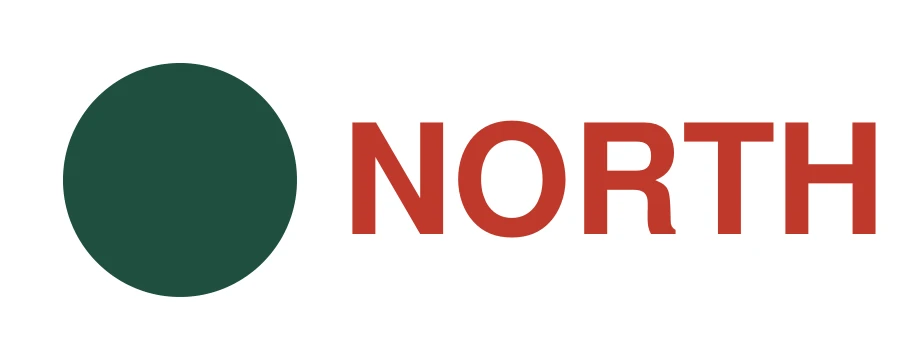
Two things follow, and only one of them is obvious. The obvious one is that we are looking at the wrong letters. The other is that the measurement is wrong too: the thinnest line in a design is often a letter stroke, and it is what decides whether the artwork can be stitched at the width you asked for.
What to do before you export
From outlined artwork to a DST delivery
Reopen your exported SVG and compare it with the original: all words should be visible, shapes should stay inside the drawing area, and any embedded picture should still appear. Then choose the finished width and garment in the free check. Vector artwork stays sharp when resized, but a small letter or narrow gap can still be too small for thread.
DST contains stitch positions and colour-change commands, not a named thread palette. Keep the supplied thread list beside the machine and confirm its embroidery area before sewing a test on the intended fabric. For a Brother or Baby Lock model that needs PES, every package also includes that file; see the machine format comparison and digitizing prices and delivery terms.
How small an SVG is
Worth knowing because it makes the 8 MB limit on vector uploads sound tighter than it is. The mark at the top of this site is 286 bytes of SVG; the example above, lettering and all, is 314 bytes. A real logo runs to tens of kilobytes. If an SVG of yours is megabytes, it almost certainly has a picture inside it.
What happens to the lettering after it reaches us — why it is re-set rather than traced, and to what sizes — is on logo to embroidery. Delivery takes 1–3 business days, most orders the same day.
Questions
- Do I need to convert text to outlines before sending an SVG?
- Yes, or tell us the words in the order form — either works, and one of them has to happen. A font name inside an SVG is a request to whatever opens it. Our reader does not have your brand typeface, so it draws the nearest thing it owns, and from then on every measurement describes that substitute rather than your wordmark. Converting text to paths (“create outlines”, “object to path”) makes the letters into shapes that cannot be swapped.
- If lettering gets redrawn anyway, why does the font matter?
- Because the redrawing is meant to be based on yours. Lettering is re-set in an embroidery letterform rather than traced, so your exact typeface will not survive to the needle whatever you send — but the digitizer works from what the file showed, and a substituted font means they are matching the wrong letterforms, the wrong spacing and the wrong weight. It also means the free check measured a shape you never drew.
- Is an SVG better than a PDF?
- Neither is better; they measure identically, which is shown on the PDF to DST page. Send whichever your design tool gives you most directly. The only real difference is the one on this page: SVG makes it easy to leave text as text, and an SVG exported with outlines has no such problem.
- My SVG has no width and height, only a viewBox. Is that a problem?
- No. The drawing is rendered to fit the working size and the width that matters is the one you type into the order in millimetres, so a file with proportions but no stated size is read the same as one with both. What does matter is that nothing important sits outside the viewBox, because what is outside it is not drawn.
- Can you take the stitches straight out of an SVG?
- No, and it is worth saying plainly because SVG looks closest to a stitch file of anything you can send. The shapes are exact, which saves the tracing, and that is the whole of the saving: stitch direction, underlay, pull compensation and the order the shapes are sewn in are decisions nobody has made yet. Our own editable source is an SVG too, and it carries all of that as extra information the drawing you send does not have.
Check your file freePrices and terms
The render and both file sizes come from web/tools/format_checks.py, which builds the example and measures it against the same checker the site runs, at 90 mm on rule set 1.3.